Competence
Computational Design — Archive of Practice
- 01Input05
- 02Geometry05
Building, organising, and controlling 3D form and computational logic.
- 02.01Organise layers logically from the startUpcoming
Archived — content in progress. Not yet available.
- 02.02Model organic shapes and topographyUpcoming
Archived — content in progress. Not yet available.
- 02.03How to model faster and speed up your workflow?
Speed comes from an anti-repetition workflow mindset — mastering shortcuts, automating repeat tasks, and keeping layers and blocks organised, not from memorising hotkeys alone.
- Aliases
- Workflow Optimisation
- Named Selection
- 02.04Make a 3D model look cleanUpcoming
Archived — content in progress. Not yet available.
- 02.05Fix broken meshes and naked edgesUpcoming
Archived — content in progress. Not yet available.
- 03Optimization03
- 04Output09
How to model faster and speed up your workflow?
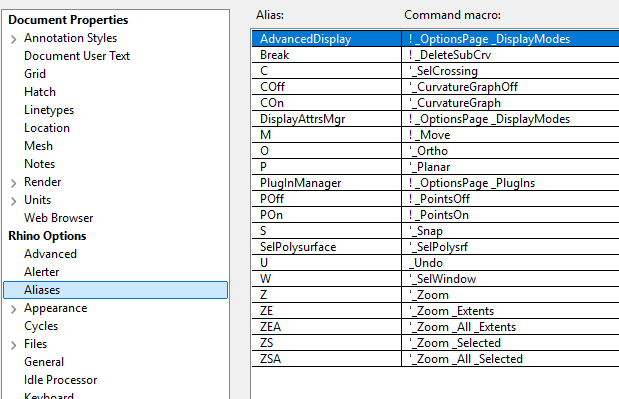
Description
Improving modelling speed is not about blindly memorising hotkeys or increasing your mouse-clicking speed; its essence lies in building an anti-repetition workflow mindset. In practice, you can optimise your workflow through the following three key aspects:
- Become proficient with commonly used default shortcuts
- Customise command aliases and keyboard combinations (such as Macros) to access tools efficiently
- Maintain rigorous Layer Management habits and utilise Rhino Blocks
Tips
-
Understand the logic, don’t just memorise
For example, if you understand how points, curves, surfaces, and solids convert into one another, you will intuitively know how to extract edges from a surface to generate curves.
-
Automate your frequent workflows
Utilise
Custom Aliases,Rhino ScriptsandGrasshopperscripts to consolidate and automate the specific workflows you use most often. -
Organise and navigate efficiently
- Set up a clean structure from the very beginning using
Layers,Blocks, andGroupsto manage your geometry and avoid messy files. - Master essential visibility and selection commands like
Hide/ShowandNamed Selections. - Use
Zoom Selectedto instantly centre your view on specific objects - And always rely on
Auto CPlaneandOsnapsto ensure geometric precision.
- Set up a clean structure from the very beginning using
Keywords
[C] concept
- Workflow Optimisation
- Geometric Logic
[L] logic
- Geometry Conversion
- Automation
[T] tool
- Aliases
- BlockManager
- Layer/Group Management
- Named Selection
- Zoom Selected
- Auto CPlane
- Osnap