Competence
Computational Design — Archive of Practice
- 01Input05
- 02Geometry05
- 03Optimization03
The bridge phase: file weight, translation between software, and computational performance.
- 03.01Build 3D models efficiently without overloading the computerUpcoming
Archived — content in progress. Not yet available.
- 03.02How to reduce file size and stop software from lagging?
Clutter, heavy textures, and unnecessarily high-resolution geometry slow files down — worksessions, blocks, and choosing the right geometry type keep files light.
- Simplify Mesh / NURBS
- Clean up scene
- Modelling Software (e.g. Rhinoceros)
- 03.03Extract data (like areas or lengths) into spreadsheetsUpcoming
Archived — content in progress. Not yet available.
- 04Output09
How to reduce file size and stop software from lagging?
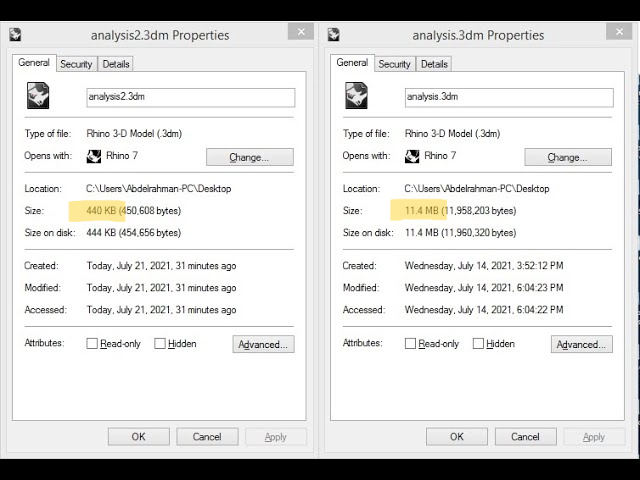
Description
As files grow during a project, they get cluttered with unnecessary geometry and heavy textures. Cleaning up your 3D models before the production phase is essential to reduce file size, prevent software crashes, stop lag, and make team collaboration much easier.
Tips
-
Use Rhino Worksession to link different models together, keeping your main editable file clean and fast.
-
Utilise Rhino Block system.
-
Always simplify the geometry and textures of downloaded assets before importing them into your project.
-
Keep NURBS for active design parts (as they use more memory), use Meshes for visual reference, and stick to Low-poly meshes for distant or background objects to prevent lag.
Keywords
[C] concept
- Reduce file size
- Clean up scene
[L] logic
- Simplify Mesh / NURBS
[T] tool
- Modelling Software (e.g. Rhinoceros)